Overview
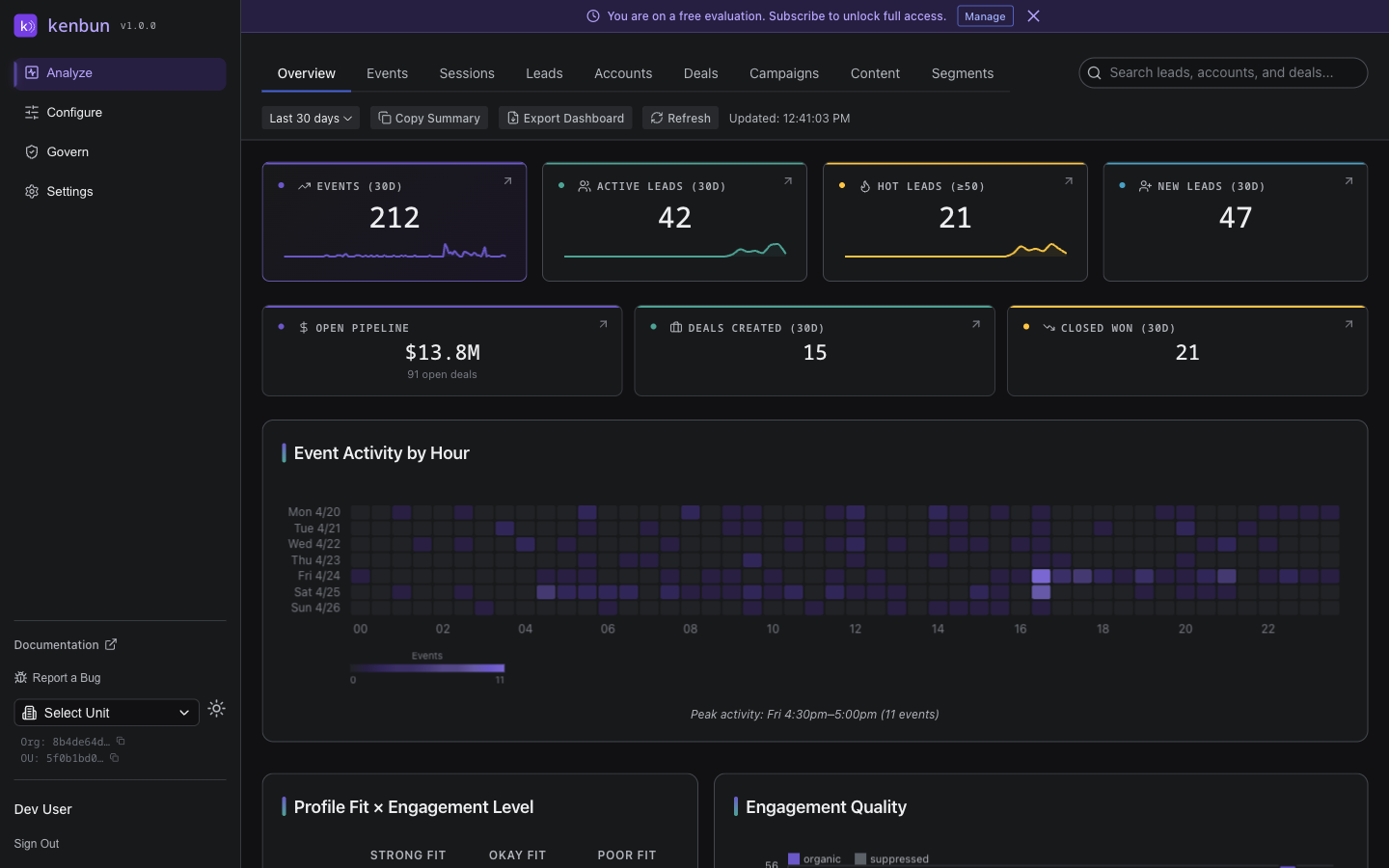
The Overview dashboard is a real-time command center built around one question: which lead should I act on right now? It pairs a live activity feed with a hot-lead spotlight, headline metrics, an activity heatmap, and lead distribution so you can move from "what's happening" to "who to call" in a glance.
What You'll See
Act Now: Hottest Lead
A banner across the top spotlights your single hottest lead -- the highest-scoring lead at or above your hot threshold. It shows the lead's name, current score (and how many times over the threshold that is), the account they belong to, when they were last seen, and the page they spend the most time on. Use View Lead to open their full activity timeline. Once you've followed up, dismiss the banner to mark it handled; when no lead is above the threshold, this area shows a calm "all clear" message instead.
Live Stream
A running feed on the left lists the most recent events as they arrive, newest first. Each row shows the lead, what they did, the page involved, how long ago it happened, and the points the event earned (when it scored). Click a lead to open their detail page, or View All Events to see the full list.
KPI Strip
Four compact cards show headline metrics for the selected time range. Each is clickable and takes you to a filtered view of the underlying leads or events:
| Metric | Description |
|---|---|
| Events | Total number of events ingested during the period |
| Active Leads | Unique leads that generated at least one event |
| Hot Leads | Leads whose engagement score meets or exceeds your highest engagement level threshold |
| New Leads | Leads created during the selected range |
Where a prior period is available, a small percentage shows how the metric has moved compared with the previous period of the same length.
Lead Temperature
A donut chart that breaks down all of your scored leads by engagement level -- for example SUPA HOT, Warm, and Cold -- with the total in the center and a count beside each level. It's the fastest way to see how much of your audience is genuinely warming up versus sitting cold.
Engagement Quality
A daily chart that separates organic engagement (rising above the line) from suppressed activity (falling below it) -- the noisy or automated traffic kenbun filtered out. A healthy workspace shows mostly organic volume with only a thin band of suppressed activity.
Event Activity by Hour
A full-width heatmap showing event volume broken down by day of week and hour of day for the last seven days. Darker cells indicate higher activity. Use this to identify:
- Peak engagement windows -- when your audience is most active.
- Quiet periods -- potential times for outreach or campaign sends.
- Anomalies -- unexpected spikes that may warrant investigation.
Profile Fit x Engagement Level
A matrix that cross-references your configured Engagement Levels (rows) with Profile Levels (columns). Each cell shows how many leads fall into that combination, helping you answer questions like:
- How many high-fit, high-engagement leads do we have?
- Are there well-fitting leads with low engagement that need nurturing?
- Where is the biggest concentration of leads?
Most Active Accounts
Accounts ranked by recent activity volume. Useful for Account-Based Marketing workflows where you want to identify which target accounts are engaging most.
Pipeline
When deals are enabled for your workspace, a compact card summarizes open pipeline value, deals created, and deals closed-won for the selected range. Select it to open the Deals view.
Toolbar Actions
- Copy Summary -- Copies a plain-text snapshot of the current KPI values to your clipboard, ready to paste into Slack, email, or a weekly standup doc.
- Export PDF -- Downloads a multi-page PDF of the dashboard, formatted for board decks and executive briefings. The PDF includes a KPI summary table, chart screenshots, and a table of your top 25 leads by engagement score. The filename follows the pattern
kenbun-dashboard-{org}-{YYYY-MM-DD}.pdf. The button is disabled while data is loading. - Refresh -- Manually reload all dashboard data. The dashboard also auto-refreshes every 15 minutes when the browser tab is active.
Time Range
The dashboard respects the global time range selector. Changing the range updates all KPI cards, the heatmap, and trend sparklines accordingly.
Best Practices
- Start with the Act Now banner. If a lead is above your hot threshold, that's your first call of the day -- view them, reach out, then dismiss to mark it handled.
- Watch the live stream. A burst of activity from one lead is often the earliest signal that they're ready to talk.
- Use the heatmap for campaign timing. Schedule emails and outreach during peak activity windows.
- Monitor the matrix. Leads in the high-fit / low-engagement quadrant are prime candidates for targeted campaigns.
Related Pages
- Events -- Drill into individual events
- Leads -- Full leads table with filtering and detail views
- Accounts -- Account-level analytics
- Sessions -- Session-based activity view
- Campaigns -- UTM-based campaign performance and attribution
- Content -- Content-piece performance with pipeline influence
- Deals -- Pipeline view with multi-touch attribution
- Segments -- Segment membership and analysis