Configure
The Configure section is where you define how kenbun calculates lead scores and automatically responds to lead behavior. This powerful system allows you to create a customized engagement model that reflects your unique sales process and priorities.
Understanding Lead Scoring
Lead scoring automatically assigns numerical values to leads based on their engagement with your business. Higher scores indicate more engaged, sales-ready prospects. kenbun's scoring system updates in real-time as new events occur.
How Scoring Works
- Events Trigger: When a lead performs an action (like opening an email or visiting your website), it creates an event
- Rules Match: kenbun checks your scoring rules to see if that event type has a point value
- Points Awarded: If a match is found, the appropriate points are added to the lead's score
- Actions Trigger: When scores cross thresholds, automated actions (triggers) can be fired
Quick Start
If you are setting up kenbun for the first time, the Quick Start wizard can generate a complete scoring configuration in minutes -- scoring rules, levels, filters, segments, and triggers -- based on your industry and preferences. See Quick Start for details.
Core Components
Rulesets
Rulesets are containers that group related scoring rules together. They allow you to:
- Organize your scoring logic into logical collections
- Enable or disable entire sets of rules at once
- Test different scoring approaches side-by-side
- Create separate scoring systems for different business needs
Each ruleset can have:
- A name to identify its purpose
- An active/inactive status
- Optional start and end dates for time‑based activation
- A custom score field for tracking scores
Creating and Managing Rulesets
You can create rulesets through:
- The Configure section in the web UI
- The API endpoints
POST /engagement-scoring/rulesetsand related routes - Bulk import processes
Each organization can have up to 4 active rulesets simultaneously, allowing sophisticated scoring approaches that track different aspects of lead engagement.
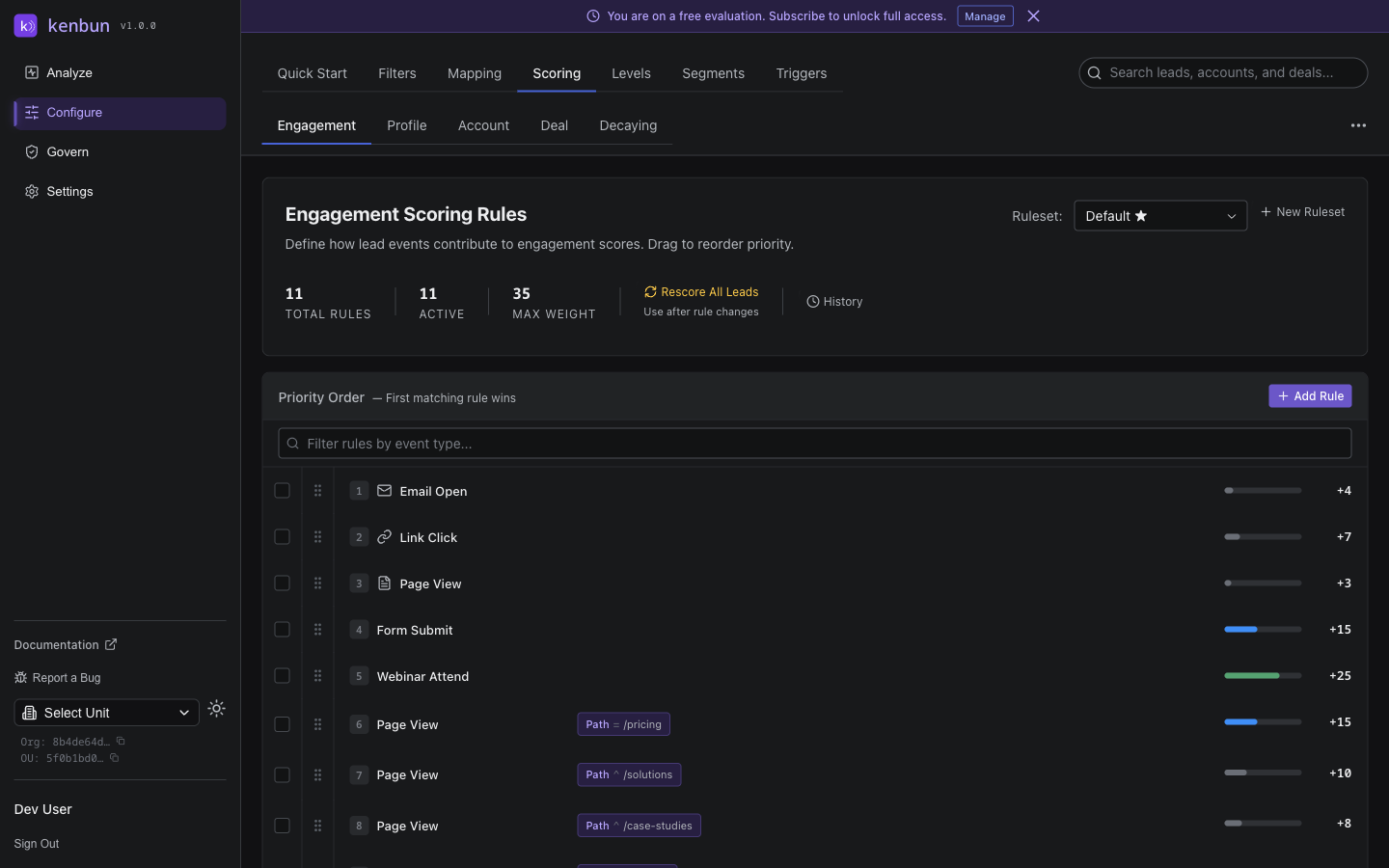
Scoring Rules
Scoring rules define how many points each event type is worth within a specific ruleset. Each rule consists of:
- Event Type: The specific action that triggers the rule (e.g.,
Email Open,Page View) - Weight: The point value to award (can be positive or negative)
- Negative scoring can be disabled per organization, forcing scores to floor at 0 when this option is turned off in Settings
- Ruleset: The collection this rule belongs to
- Active Status: Whether this rule is currently enabled
- Date Range: Optional start and end dates for time-based activation
Working with Scoring Rules
Rules can be managed through:
- Web UI: Create, edit, and delete rules in the Configure section
- API: Use endpoints like
POST /engagement-scoring/rules,PUT /engagement-scoring/rules/{id},DELETE /engagement-scoring/rules/{id} - Bulk Operations: Import rules from CSV files
Each rule belongs to exactly one ruleset, so the same event type can be scored differently in different rulesets.
Rule Best Practices
- Event Type Consistency: Use the same naming conventions for event types across your organization
- Clear Value Proposition: Assign point values that reflect actual business impact
- Regular Audits: Periodically review rules to ensure they're driving valuable outcomes
- Documentation: Keep notes on why certain rules exist and what they're intended to accomplish
Best Fit Scoring (Profile & Account)
In addition to event-based scoring, kenbun supports "Best fit" scoring based on attributes rather than actions. This helps teams score how good of a fit a person or company is, using demographic/firmographic data alongside behavioral data.
Profile Scoring Rules (Available Now)
- Profile Mapping: Map incoming event metadata to standard profile properties (see Mapping)
- Scoring Rules: Score leads based on their profile attributes
Account Scoring Rules (ABM)
- Account Mapping: Map incoming metadata to account fields (e.g., domain, industry) (see Mapping)
- Scoring Rules: Score accounts based on their attributes
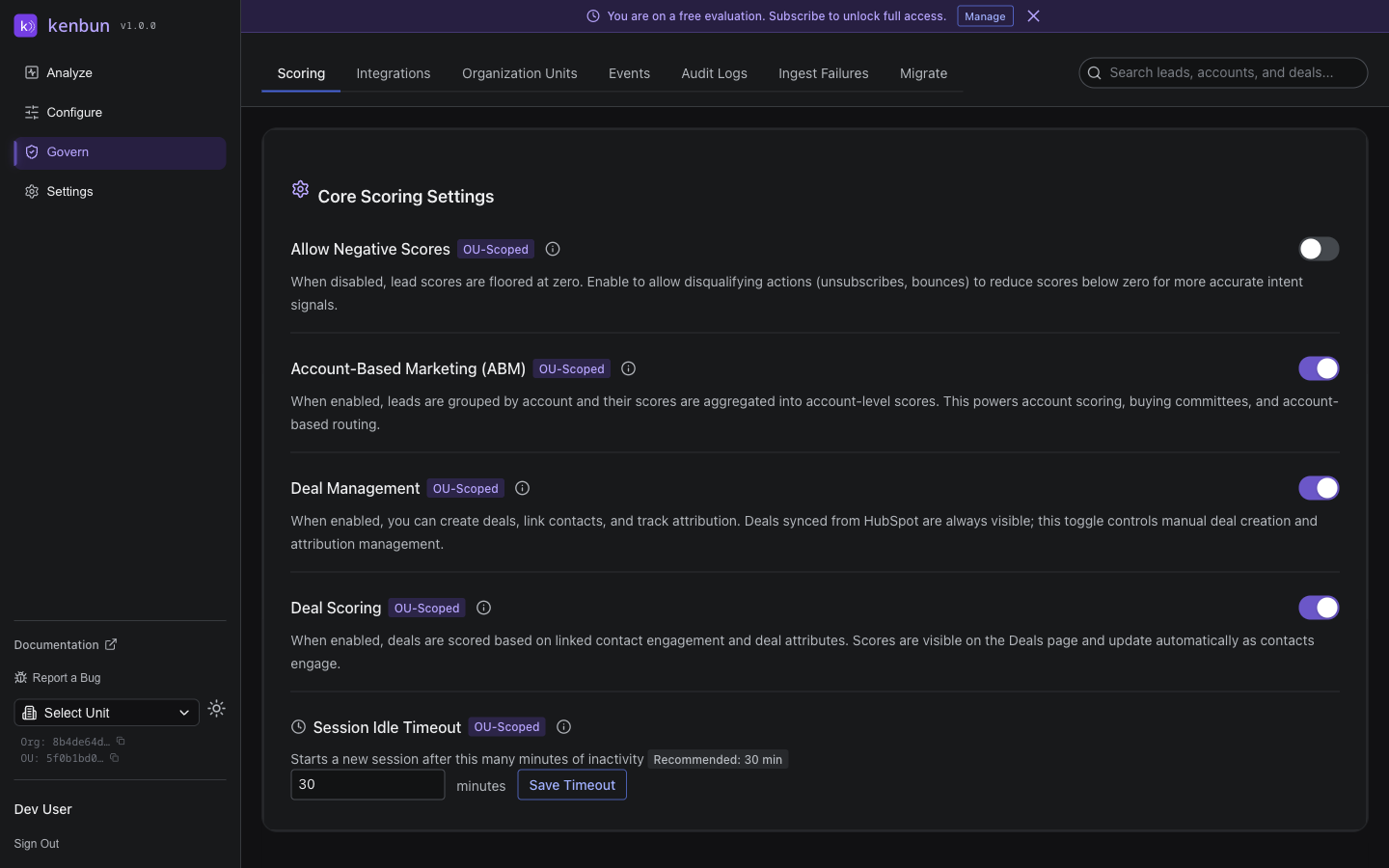
Availability: Account-based marketing (ABM) is controlled per organization in Settings → Scoring. When ABM is enabled, the app surfaces Account Scoring Rules in the left navigation, shows the "Account" column in Leads, and adds the "Account Metadata" tab on the lead detail page.
API: The ABM toggle and the negative-scoring setting are returned by GET /settings/scoring and updated via PUT /settings/scoring. See Scoring Settings.
Hard disqualification: Profile and account rules can be typed as hard-disqualification rules to remove a lead from the pipeline entirely (no contact path, competitor, hard bounce, off-territory). Disqualified leads are hidden from default views and excluded from triggers, with a full audit trail. See the Hard Disqualification guide.
Levels
Levels define score ranges that correspond to different phases of your sales process. kenbun supports three types of levels:
Engagement Levels: Bucket a lead's engagement score into named ranges
- Example: Cold (0-24 points) → Warm (25-49 points) → Hot (50-74 points) → Very Hot (75+ points)
Profile Levels: Bucket a lead's profile fit score
- Example: Poor Fit (0-24 points) → Okay Fit (25-49 points) → Strong Fit (50+ points)
Account Levels (ABM): Bucket account scores when ABM is enabled
- Example: Low (0-24 points) → Medium (25-49 points) → High (50+ points)
Levels help your team prioritize leads based on their engagement and fit, and guide appropriate follow-up actions.
Decay Rules
Decay rules automatically reduce lead scores over time when no activity occurs, ensuring scores remain current and relevant:
- Inactive Period: Time period with no engagement before decay begins
- Point Reduction: Number of points to remove per decay cycle
- Frequency: How often decay occurs (daily, weekly, etc.)
Example: Reduce scores by 2 points each day after 7 days of inactivity to reflect waning interest.
For per-signal exponential decay (each event's contribution fades on its own curve), see the Half-Life Decay guide. Half-life and decay rules can be used together.
Filters
kenbun provides two types of filters to keep artificial activity out of your lead scores. Both are found under Configure > Filters.
Velocity Based Filters watch for bursts of the same event type from a single lead. When a lead exceeds a threshold within a time window, subsequent events are suppressed. An optional Keep First, Suppress Rest toggle lets the first event in a burst still score — useful for high-value event types like Demo Request. See Velocity Based Filters.
Attribute Based Filters suppress events whose metadata matches key/value conditions you define — for example, suppressing Page View events where user_agent contains "bot", or excluding any event tagged source: "qa". Attribute based filters evaluate before velocity checks, so known bad actors are dropped before they affect rate counting. See Attribute Based Filters.
Both filter types exclude matching events from scoring, session creation, and lead creation. Suppressed events are still stored in kenbun for audit purposes.
Triggers
Triggers automate actions when leads meet specific conditions, helping your team respond quickly to high-value prospects:
Milestone Triggers
Fire when a lead crosses a score threshold:
- Notify sales when a lead reaches 50 points
- Send automated email when score hits 75
- Create CRM tasks for leads scoring 100+
Sequence Triggers
Fire when leads perform specific sequences of actions:
- Contact form submission → page view → email open within 24 hours
- Signup → email open → webinar attendance → demo request
- Product trial → API call → purchase inquiry
Surge Triggers
Fire when a lead's activity suddenly accelerates — a sharp spike in engagement within a short window, regardless of their overall score. Useful for catching re-engaged leads and time-sensitive buying signals.
All trigger types can send notifications to Slack, Teams, webhooks, or email.
Segments
Segment rules let you define criteria that automatically group leads into named segments based on their profile properties, event metadata, engagement levels, or account attributes. Segments are dynamic -- leads enter and exit as their data changes.
See Segment Rules for a complete guide to creating and managing segments.
Implementation Approach
Getting Started with Configure
- Start Simple: Begin with one ruleset that reflects your basic scoring needs
- Define Key Events: Identify 3-5 critical event types that signal engagement
- Set Conservative Points: Use modest point values that can be refined later
- Monitor and Adjust: Watch scores for the first week and adjust as needed
Building Advanced Systems
- Multiple Rulesets: Create separate rulesets for different lead types or business units
- Profile Integration: Combine behavioral and profile-based scoring
- Temporal Rules: Use date ranges to adjust scoring during campaigns or seasons
- Automated Actions: Set up triggers to maximize sales team efficiency
Best Practices
Scoring Philosophy
- Quality over Quantity: Focus on meaningful engagement rather than any activity
- Sales Alignment: Ensure scoring reflects what sales actually cares about
- Continuous Improvement: Regularly review and adjust scoring effectiveness
- Transparency: Make scoring logic visible and understandable to all teams
Rule Management
- Document Everything: Keep notes on why rules exist and what they're intended to accomplish
- Version Control: Track changes to major rule modifications
- Backup Plans: Have alternative scoring approaches for different business scenarios
- Regular Audits: Review scoring effectiveness at least monthly
Team Coordination
- Sales Feedback: Regularly solicit input from sales on lead quality
- Marketing Input: Include marketing's perspective on engagement signals
- Data Analysis: Use score performance data to optimize rules
- Training: Ensure all team members understand how scoring works
Troubleshooting Common Issues
Scores Not Updating
- Verify rules are active and within date ranges
- Check that event types match exactly (case-sensitive)
- Ensure events are successfully ingesting without errors
Rules Not Firing
- Confirm trigger conditions match actual lead scores
- Check that triggers are enabled and not paused
- Verify webhook URLs and email addresses are correct
Inconsistent Scoring
- Look for conflicting rules that might be canceling each other out
- Check that date ranges align with expected scoring periods
- Ensure decay rules aren't unintentionally reducing scores
Keep Things Simple
- Group related rules so it’s easy to understand and maintain
- Remove rules you no longer use
- Use date ranges for seasonal campaigns when needed
By mastering the Configure system, you'll be able to create a sophisticated lead engagement model that prioritizes the right prospects at the right time with the right messaging.