Watch List
The Watch List feature lets you track specific leads and monitor their engagement over time. You can add leads to your personal watch list, make optional predictions about their likelihood to convert, and see how their scores change from the moment you started watching them.
Why Use the Watch List?
The Watch List helps you:
- Track High-Value Prospects: Keep tabs on your most important leads
- Monitor Score Changes: See how lead engagement evolves over time
- Test Your Intuition: Make predictions and track your accuracy
- Stay Organized: Focus on leads that matter most to you
- Improve Qualification: Learn which signals actually predict conversion
How It Works
Adding Leads to Your Watch List
You can watch a lead from two places:
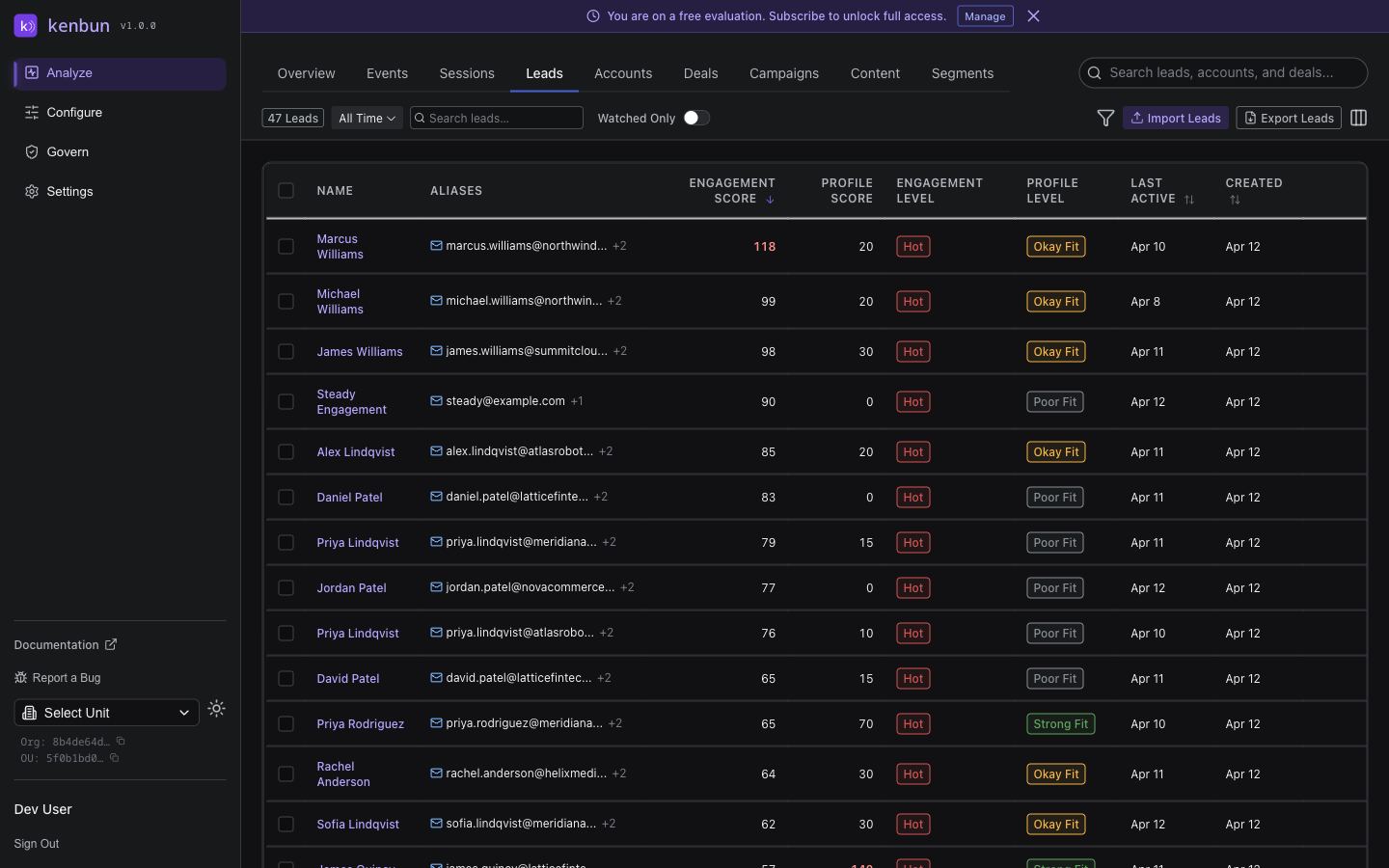
From the Leads Table:
- Navigate to Leads
- Find the lead you want to watch
- Click the star icon next to their name
- Optionally add a prediction and notes
From Lead Detail Page:
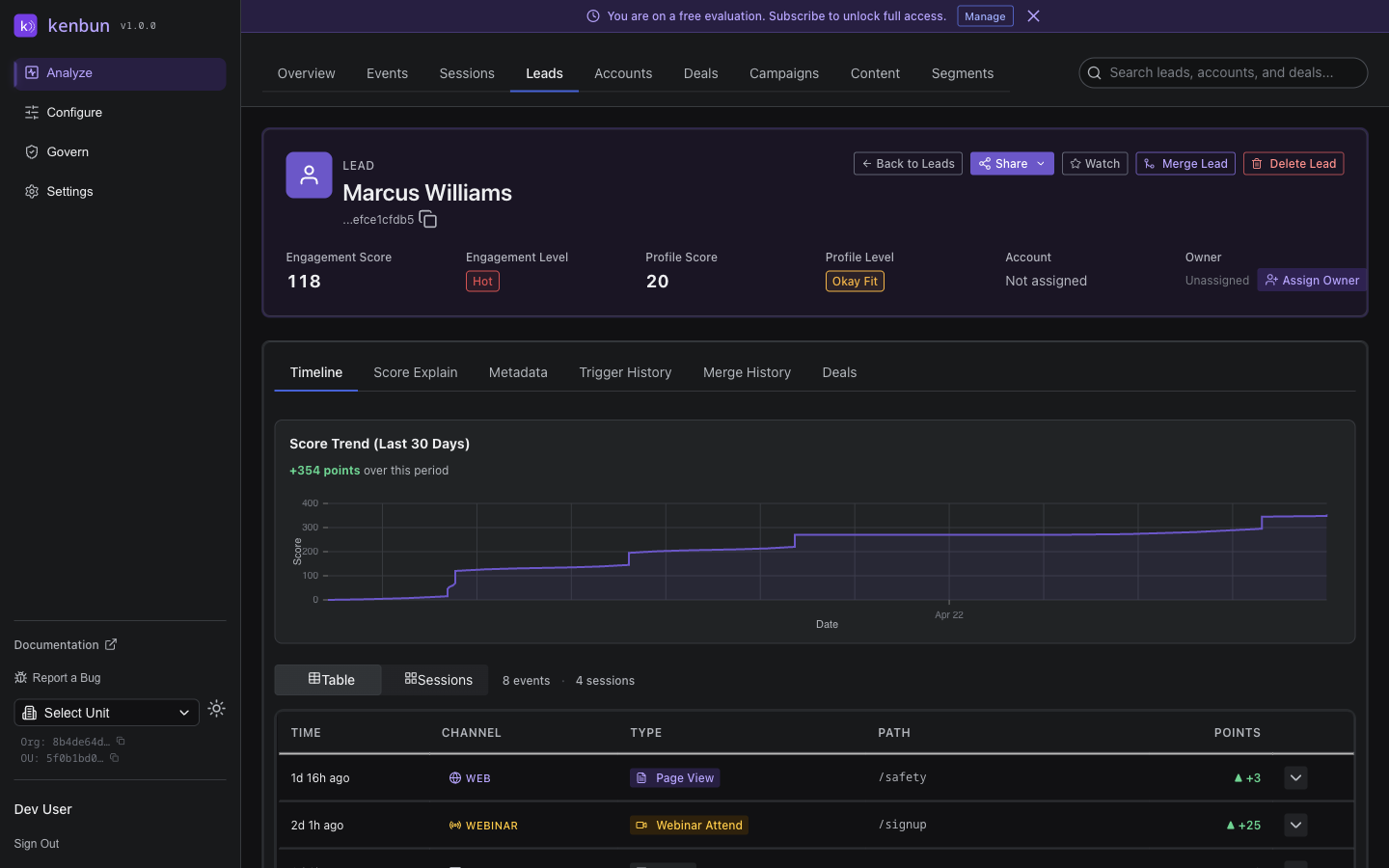
- Open any lead's detail page
- Click the watch icon button (star icon) in the header
- Optionally add a prediction and notes
- Click Add to Watch List
Making Predictions (Optional)
When you add a lead to your watch list, you can optionally record a prediction about whether they will convert. This helps you:
- Track your qualification accuracy over time
- Learn which engagement patterns actually lead to conversions
- Improve your lead scoring intuition
Prediction Options:
- Will Convert: You believe this lead will become a customer
- High Value: This lead will generate significant revenue
- Quick Win: This lead will convert soon
- Long Term: This lead needs extended nurturing
- Custom predictions (free text)
You can also add notes explaining your reasoning.
Viewing Your Watch List
Access your watch list from the dashboard widget or dedicated page:
Dashboard Widget:
- See recently watched leads
- View current scores and score changes
- Quick link to lead details
Full Watch List Page:
- Navigate to Watched Leads (if available in your navigation)
- Or access via the dashboard widget's "View All" link
Understanding Score Changes
For each watched lead, you'll see:
- Current Score: The lead's score right now
- Score at Watch Time: What the score was when you added them
- Score Delta: The change since you started watching (e.g., +15 points)
- Score Trend: Visual indicator of score direction (up, down, stable)
Example:
Lead: Jane Doe
Current Score: 75 points
Score When Watched: 60 points
Score Delta: +15 points ↑
Watched Since: Jan 15, 2025
This helps you understand if a lead is becoming more or less engaged over time.
Watch List Features
Personal and Private
Your watch list is private to you:
- Other team members can't see which leads you're watching
- Each user has their own independent watch list
- Predictions and notes are visible only to you
Automatic Score Tracking
kenbun tracks score changes automatically:
- Score snapshots are taken hourly for all leads
- When you watch a lead, the system captures their current score
- Score deltas are calculated in real-time when you view your watch list
- No manual tracking required
Prediction Accuracy Stats
Track how accurate your predictions are over time:
Metrics Available:
- Total Watched: How many leads you've watched
- Total Predictions: How many predictions you've made
- Correct Predictions: Predictions that came true
- Accuracy Percentage: Your overall prediction accuracy
- Pending Outcomes: Leads you're still waiting to see results for
This feedback loop helps you refine your lead qualification skills.
Removing Leads from Watch List
To Unwatch a Lead:
- Click the star icon again (from Leads table), or
- Click the watch icon button again on the lead detail page to toggle it off, or
- Remove from your watch list page
Unwatching a lead removes it from your watch list but retains the historical record.
Watch List Dashboard Widget
The Watch List widget on your dashboard provides a quick overview:
Widget Shows:
- Number of leads you're watching
- Recently added leads
- Biggest score increases
- Biggest score decreases
- Quick stats on your predictions
Widget Actions:
- Click any lead to view details
- Click View All to see full watch list
- Click Add Lead to watch a new lead
Using Watch List Effectively
Best Practices
When to Watch a Lead:
- Lead shows initial buying signals
- Lead reaches a specific score threshold
- Lead is assigned to you by sales
- Lead matches your ideal customer profile
- Lead is from a high-value account
Making Better Predictions:
- Be Specific: Instead of "will convert", try "will convert within 30 days"
- Add Context: Use notes to explain your reasoning
- Review Regularly: Check which predictions were right and why
- Track Patterns: Look for common traits in leads that convert
- Adjust Thresholds: Update your scoring rules based on learnings
Keeping Your List Manageable:
- Watch 10-20 leads at a time maximum
- Remove leads once they convert or go cold
- Use predictions to prioritize follow-up
- Review your watch list weekly
Common Workflows
Sales Rep Workflow:
- Marketing shares a hot lead
- Add lead to watch list with "Will book demo" prediction
- Monitor score changes over next week
- Reach out when score increases significantly
- Update outcome when lead books demo or goes cold
Marketing Ops Workflow:
- Segment identifies new MQLs
- Add top 10 MQLs to watch list
- Predict which will become SQLs
- Monitor engagement patterns
- Refine MQL criteria based on actual SQL conversion
Account Manager Workflow:
- Existing customer shows renewed engagement
- Add to watch list with "Upsell opportunity" prediction
- Track which content they're consuming
- Time outreach based on engagement spike
- Track outcome success rate
API Access
You can manage your watch list programmatically:
Watch a Lead
POST /leads/{leadID}/watch
Add a lead to your watch list.
curl -X POST "https://api.kenbun.io/leads/ld_123/watch" \
  -H "Authorization: Bearer <token>" \
  -H "Content-Type: application/json" \
  -d '{
    "prediction": "will_convert",
    "prediction_notes": "Strong engagement on pricing page + demo request"
  }'
Request Parameters:
| Parameter | Type | Required | Description |
|---|---|---|---|
prediction | string | No | Your prediction about this lead |
prediction_notes | string | No | Notes explaining your prediction |
Response:
{
  "watch_id": "watch_abc123",
  "lead_id": "ld_123",
  "message": "Lead added to watch list"
}
Unwatch a Lead
DELETE /leads/{leadID}/watch
Remove a lead from your watch list.
curl -X DELETE "https://api.kenbun.io/leads/ld_123/watch" \
  -H "Authorization: Bearer <token>"
Get Watched Leads
GET /watched-leads
Retrieve your complete watch list with score data.
curl -X GET "https://api.kenbun.io/watched-leads" \
  -H "Authorization: Bearer <token>"
Response:
{
  "watched_leads": [
    {
      "watch_id": "watch_abc123",
      "lead_id": "ld_123",
      "prediction": "will_convert",
      "prediction_notes": "Strong engagement signals",
      "watched_at": "2025-01-15T10:00:00Z",
      "outcome": "pending",
      "outcome_at": null,
      "current_score": 75,
      "score_at_watch": 60,
      "score_delta": 15
    }
  ],
  "count": 1
}
Get Watch List Statistics
GET /watched-leads/stats
Get your prediction accuracy statistics.
curl -X GET "https://api.kenbun.io/watched-leads/stats" \
  -H "Authorization: Bearer <token>"
Response:
{
  "total_watched": 25,
  "total_predictions": 20,
  "correct_predictions": 15,
  "pending_outcomes": 8,
  "accuracy_percent": 75.0
}
Troubleshooting
Can't See Watch List Widget
- Check that you're logged in and have an active Organizational Unit selected
- The widget may not appear if you haven't watched any leads yet
- Contact your administrator if the feature is not enabled
Score Delta Shows Zero
- The lead may have been watched very recently (score snapshots run hourly)
- The lead may have had no activity since you started watching
- Check back after a few hours to see score changes
Prediction Accuracy Seems Wrong
- Accuracy is calculated only for leads with recorded outcomes
- "Pending" outcomes don't count toward accuracy
- Make sure you're updating outcomes when leads convert or go cold
- Contact support if you believe there's a calculation error
Related Features
- Score History: See detailed score trends over time for any lead
- Lead Detail Page: Full engagement timeline and scoring breakdown
- Segments: Group leads by engagement level or other criteria
- Milestone Triggers: Automate alerts when leads reach score thresholds